Buy Credits Pack

You don’t have enough credits to complete this request.As a subscription member, you can buy one-time lifetime credits that never expire—no subscription and no auto-renewal. Use them anytime to create songs, instrumentals, or music content.

Upgrade to Annual

Get access to our most advanced AI model and create music for commercial use

What You'll Get with Annual
V3 Model Access on Every Generation Our latest and most advanced AI music generator with superior quality
Commercial License Included Use your AI-generated music for monetization, ads, and business projects
Save Over 50% vs. Monthly Best value plan with significant savings compared to month-to-month billing
Choose Your Annual Plan
💰 Remaining monthly fee will be deducted at checkout.

MSong.ai – AI Music Video Generator That Makes Photos Sing

Upload one vertical photo and a song, and MSong AI turns them into a short music video with AI lipsync and on-screen subtitles — perfect for TikTok, YouTube Shorts, Instagram Reels, and other short-form platforms.

AI Lipsync • Make Photos Sing Auto Captions • Lyric Videos Music Video Maker Virtual Singer • Voiceovers

AI Music Video Generator Tool

Click to upload or drag audio here

MP3, WAV (max 10 minutes)

Upload a song, vocal track, voiceover, or podcast clip. Max video: 60s.

Start: 0:00 Duration: 1:00
0:00
1:00

Click to upload a vertical photo

JPG, PNG (Max 10 MB)

Use a portrait image with clear face.

Uploaded image
0/1000
Credits required: 0 (Audio: 0s)

Billed by saved audio length in 5-second increments. 720p costs 2× 480p.

480p Resolution Examples
AI Music Video Generating...
Please don't leave this page

Turn Any Song and Photo into a Vertical AI Music Video

Most creators already have finished songs or voiceovers but no time to edit video. With MSong.ai’s AI Music Video Generator, one audio file and one photo are enough to produce a ready-to-post vertical clip.

One Photo

A clear single-person portrait, avatar, logo, or artwork you own — vertical images work best.

One Audio File

Your song, voiceover, podcast clip, or background music as an MP3 or WAV file.

From these inputs, MSong.ai generates a short 9:16 video (up to 60 seconds) with synced lips, natural motion, and readable subtitles. Export the clip and share it on TikTok, YouTube Shorts, Instagram Reels, Facebook, and more.


when skies are gray

How MSong.ai’s AI Music Video Generator Works

Upload your audio and a vertical photo, choose up to 60 seconds, add a short prompt, and MSong.ai creates an AI lipsync music video with subtitles in 30+ languages — ready to download and post.

1

Upload Materials

PHOTO
Sample portrait
AUDIO
PROMPT
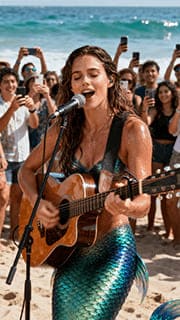
"A mermaid is playing the guitar and singing on a sandy beach by the sea, while humans around her are taking photos."

First, upload your audio and trim it. Then upload a clear, vertical photo. Enter a simple prompt and choose a resolution to finish.

2

AI Processing

Advanced AI analyzes and synchronizes facial movements with music

Our AI lipsync engine matches lip shapes, expressions, and timing to every word.

3

Get Your Video

480p Video Example
Ready to download

Download your vertical AI music video with subtitles, ready for social media.

MSong.ai AI Music Video Generator Features

Make Photos Sing

Turn any static portrait or character into a talking or singing avatar. MSong AI lipsync animates the mouth and face to follow your audio naturally.:

  • Great for songs, hooks, and vocal tracks
  • Works for intros, outros, and narration
  • Highlights key moments from podcasts or interviews

Lyric Videos with Auto Captions

Create lyric-style videos without typing subtitles by hand. MSong.ai automatically turns your audio into clean, easy-to-read captions.:

  • Transcribes your audio into short phrases
  • Keeps captions in sync with every word
  • Supports over 30 languages for subtitles

AI Lipsync Engine

MSong AI lipsync maps phonemes, timing, and emphasis in your audio to realistic mouth shapes and facial motion in the video.:

  • Smooth lipsync for both singing and speech
  • Facial expressions that match the emotion of the track
  • Consistent results across different songs and voices

AI Dance Videos

Even with one still photo, MSong.ai can add subtle head and upper-body movement so your character looks like they’re dancing or performing to the beat.:

  • Ideal for dance challenges and music trends
  • Loop-friendly for DJ sets, beats, and remixes
  • Makes simple artwork feel alive on mobile feeds

Virtual Singer for Your Tracks

Don’t want to show your real face? Use a character, avatar, or logo as your virtual singer and build a visual identity around your music.:

  • Perfect for anonymous artists and VTubers
  • Great for brands, mascots, and channels
  • Keeps your personal identity private while your music is public

MSong.ai AI Music Video Generator Help

MSong.ai’s AI Music Video Generator turns one photo and an audio file into a short vertical video with AI lipsync and subtitles. It’s designed for music clips, voiceovers, and podcast excerpts that need fast, social-ready visuals.

Each clip can be up to about 60 seconds, which fits perfectly on TikTok, YouTube Shorts, Instagram Reels, Facebook Stories, and other short-form platforms.

AI lipsync is the technology that makes your character’s lips, face, and upper body move in time with your audio. MSong.ai analyzes your song or voice, matches mouth shapes to each word, and generates frames where the character appears to sing or speak naturally.

To create an AI music video with MSong.ai, you only need one vertical photo in JPG or PNG format with a clear single face or character, plus one audio file in MP3 or WAV format such as a song, voiceover, or podcast clip.

The subtitle engine supports 30+ languages, including English, Spanish, French, Portuguese, German, Italian, Dutch, Japanese, Korean, Chinese, Turkish, Arabic, Hebrew, Swedish, Romanian, Polish, Russian, Ukrainian, and more. If your audio is clear and in one of these languages, MSong.ai can usually generate accurate captions automatically.

You can do both. You can generate original tracks with MSong AI Song Generator or upload your own finished MP3/WAV files. As long as you have the rights to the audio, you can use it to create AI music videos.

In many cases, you can use videos generated from content you own for commercial projects, social media promotion, or client work. However, you are responsible for ensuring you have the necessary rights to the images, audio, characters, and any brands or people shown, and for following MSong.ai’s terms of use and each platform’s copyright rules.

For the best AI lipsync results, use a vertical portrait-style photo with one complete face looking toward the camera, with clear details and balanced lighting, and avoid sunglasses, heavy masks, strong motion blur, or crowded scenes.

If a video fails to generate due to a technical issue on our side, the credits used for that attempt are automatically returned to your account so you can try again. The system also includes internal checks to reduce errors during AI processing.

No. The workflow is designed for non-editors: upload your audio, upload a photo, adjust the length to under 60 seconds, add a short prompt, and click create. MSong.ai handles the lipsync, animation, and captions automatically so you can focus on your music and ideas.

Start with MSong AI Song Generator

Create a track with MSong.ai’s AI Song Generator, then turn it into an AI lipsync music video in just a few steps — no video-editing skills required. Write your own lyrics or let the AI help, generate the song, and convert it into a vertical clip with captions for TikTok, Shorts, and Reels.

Generate AI Song on MSong.ai